
Proving an offline-first field app across Android and Windows
Field service - Proof of concept
Hardy Mechanical needed to know whether technicians could securely access assigned work in places where connectivity could not be assumed.
- Role
- Principal Software EngineerSolution Architect
- Platforms
- Android and Windows
- Status
- Proof of concept
- Client
- Kwixand Solutions Inc.
Authenticated
Microsoft Entra ID
Connected
Business Central gateway
Available offline
Locally retained job data
Delivered twice
Android and Windows
Field continuity
One product model, tested in the places field work actually happens.
The proof was not a screen tour. It was a working slice: sign in, read assigned work, lose connectivity, keep going, then return online without changing the screen contract.
01
Identity
02
Offline read
03
Two targets
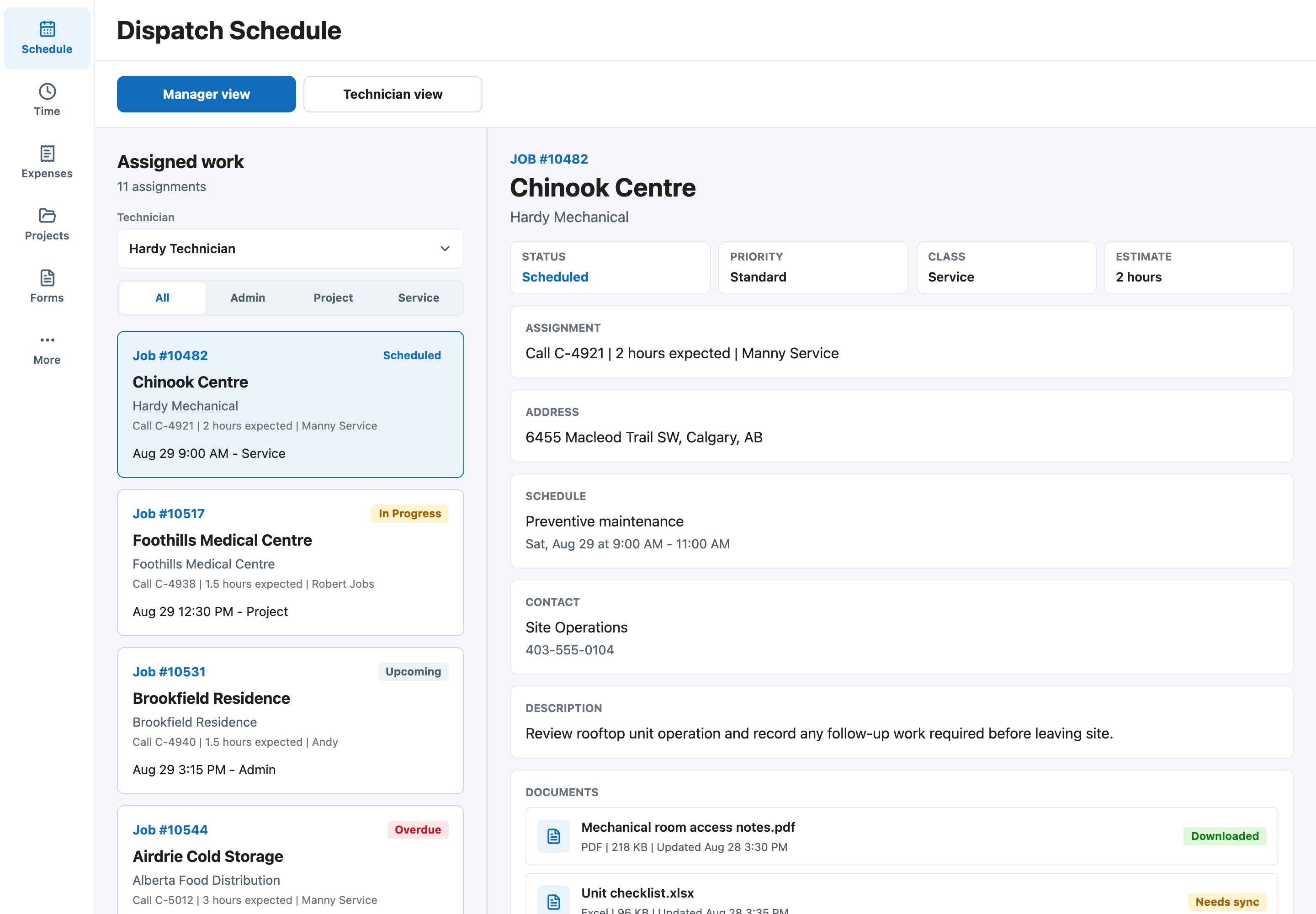
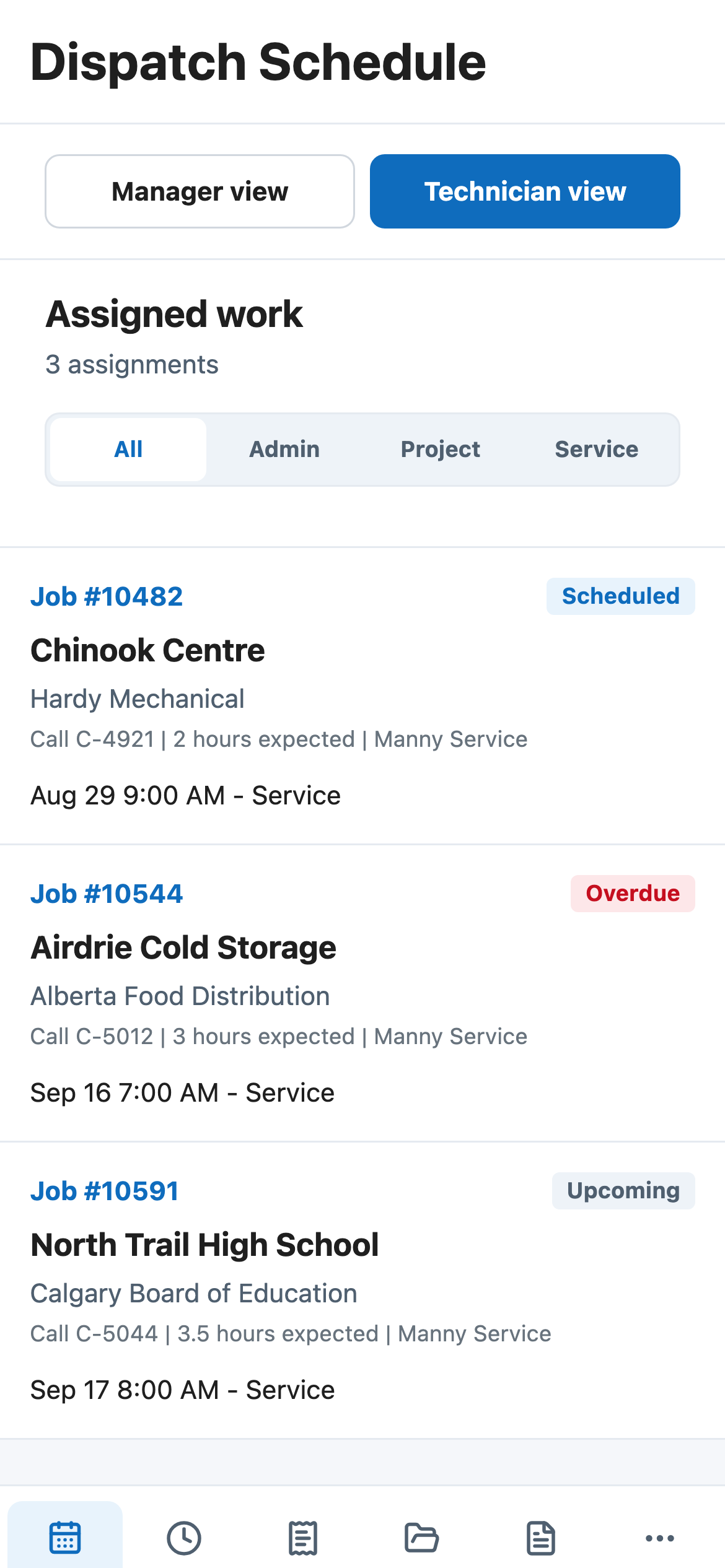
Field service does not happen at a desk
Hardy Mechanical technicians work wherever the equipment is: commercial buildings, active construction sites, mechanical rooms, and basements. Those environments make reliable connectivity an unsafe assumption.
Kwixand Solutions Inc., a Microsoft Partner, had already built Hardy's original field workflow in Power Apps. The proof of concept explored whether a React-based application could give technicians secure access to assigned projects, documents, and dispatch information across Android and Windows without making connectivity a prerequisite.
Reducing the platform vision
The goal was not to reproduce Hardy's entire operational system. The proposed platform could eventually include technician workflows, expense validation, management approval, dispatch, documents, photos, signatures, and internal tools. Building all of that would have produced a larger demo without necessarily answering the hardest questions.
I reduced the proof of concept to four assumptions:
- Can a technician authenticate through Microsoft Entra ID?
- Can assigned work come from Business Central through a controlled application boundary?
- Can previously synchronized information remain available without a network connection?
- Can the same product be delivered credibly across Android and Windows?
I defined the reduced proof-of-concept scope, designed the offline data model and synchronization approach, implemented the authentication and data-access flows, built the assigned-work interface, and prepared the application for its target device paths.
The application boundary did two jobs: technicians signed in through Microsoft Entra ID, while Business Central records were mapped into field-facing job contracts before the interface rendered them. The device did not need direct ownership of enterprise credentials to make the workflow useful.
System boundary
Keep enterprise systems authoritative. Keep the field app useful.
Devices run the field experience.
The app boundary owns session, mapping, cache, and sync.
Enterprise systems remain authoritative.
People and devices
Technician layer
Android phone
Field-focused job list, detail view, offline banner, and cached assigned work.
Windows app path
Wider layout and packaging direction without changing the product model.
Application boundary
Shared app core
Session and auth state
The app tracks sign-in state without putting production secrets in the device package.
Job contract
Business Central records are mapped into product language before screens render them.
Local offline store
Screens read a local snapshot first. Sync refreshes that snapshot when network access exists.
Enterprise systems
Source systems
Microsoft Entra ID
Organizational identity provides the sign-in path for technicians.
Business Central
Assigned dispatch work remains the enterprise source of truth.
Intune direction
Packaging and rollout were treated as production decisions, not an afterthought.
Designing one field workflow
The first product experience stayed narrow: sign in, see assigned jobs and dispatch information, open a job, review the details needed in the field, keep reading when connectivity disappeared, and return online without restarting the experience.
That was enough to test the foundation without confusing feasibility with a finished product.
The same job contract supports a wider list-and-detail workspace without becoming a separate product.
Assigned work
The field view stays focused on the technician.
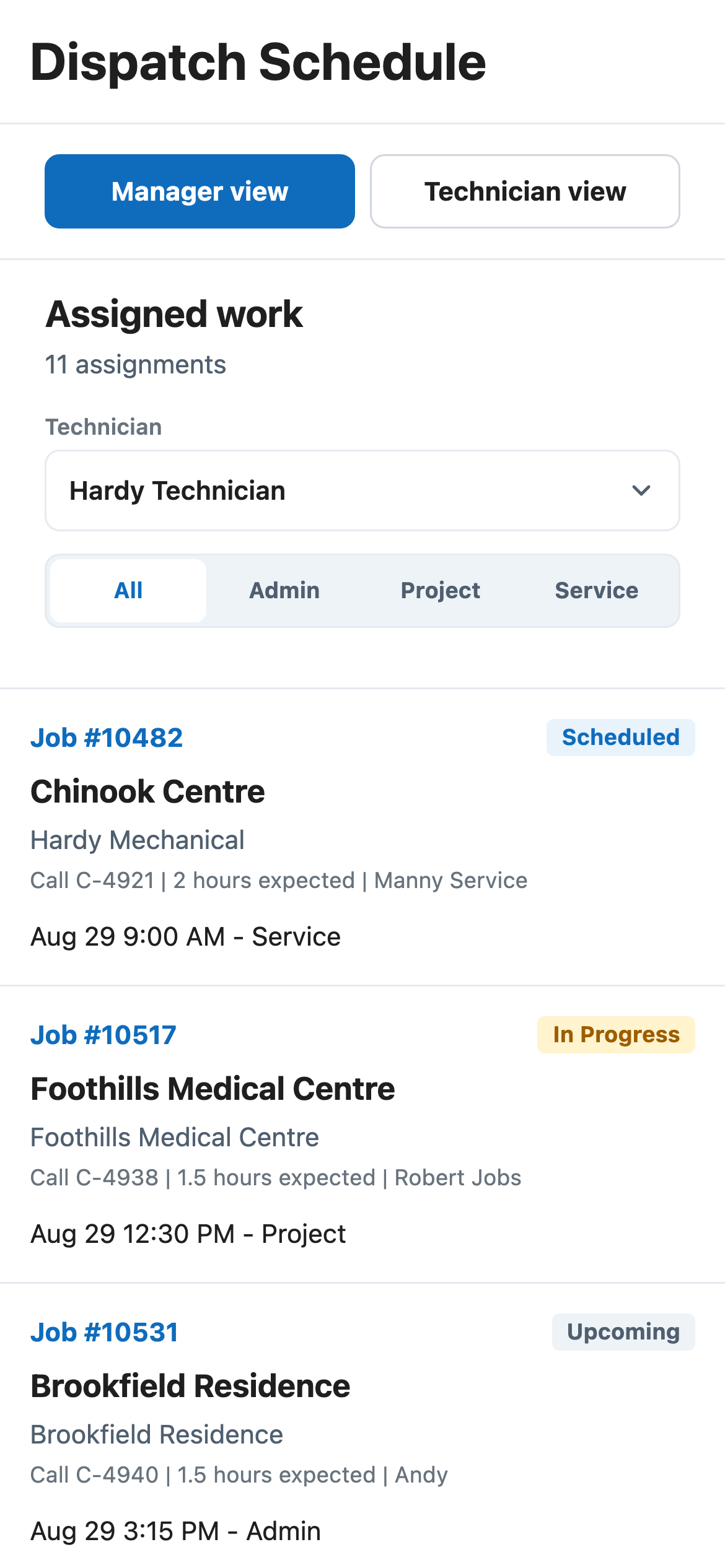
Schedule
The same work model supports a wider operating view.
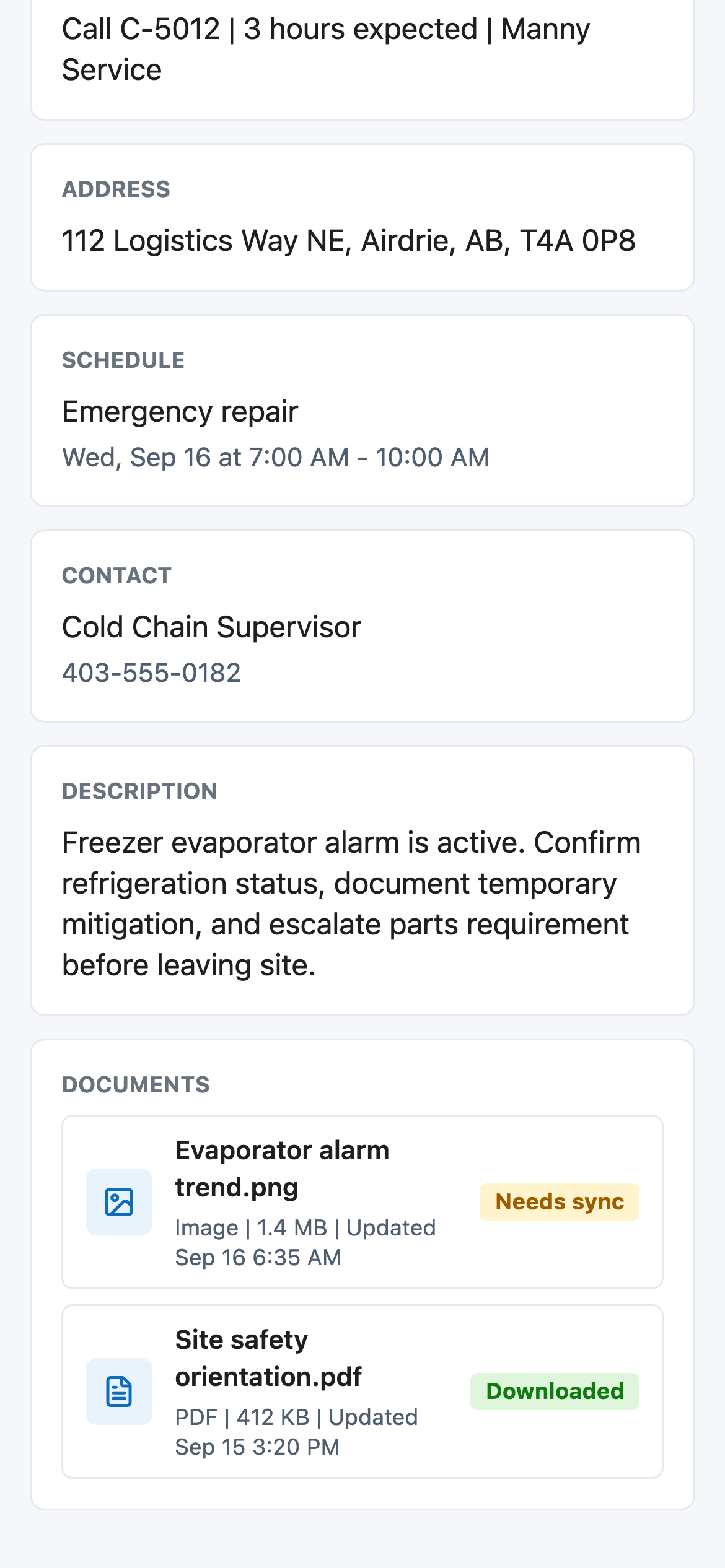
Detail
Documents stay with the job context.
The same product model supported a phone in the field and a wider Windows workspace. Shared code covered product logic, data mapping, state handling, theme tokens, and most of the interface structure; platform-specific seams stayed available where the devices needed to behave differently.
Building around unreliable connectivity
Offline access could not be an error screen or a later enhancement. Connectivity had to be treated as application state that could change at any point during a technician's work.
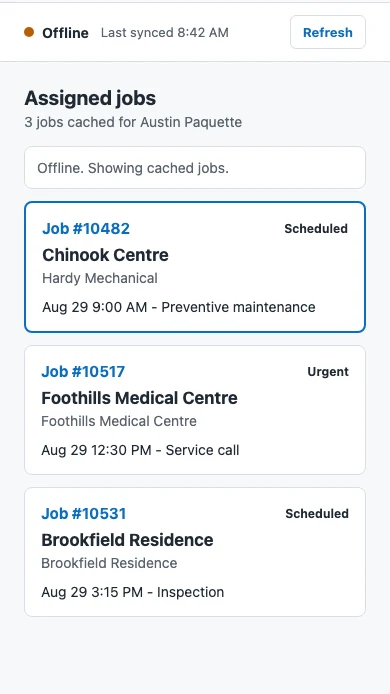
The app reads screens from local data. When network access is available, sync refreshes the local snapshot from Business Central. When connectivity is unavailable, the app continues showing previously synchronized assigned work and uses a small banner to explain the state.
Offline behaviour
The useful proof was that the screen kept working after the network stopped helping.
The proof of concept treated connectivity as changing application state. Assigned work synchronized while online, then remained available from the local snapshot when signal was unavailable.
Cache state
Readable offline
The interface keeps reading from the local snapshot while sync waits for the network to return.
01
OnlineLoad assigned work
The technician signs in and synchronizes assigned jobs into a local read model.
02
OfflineLose the signal
The connection state changes, but the list does not disappear or become an error screen.
03
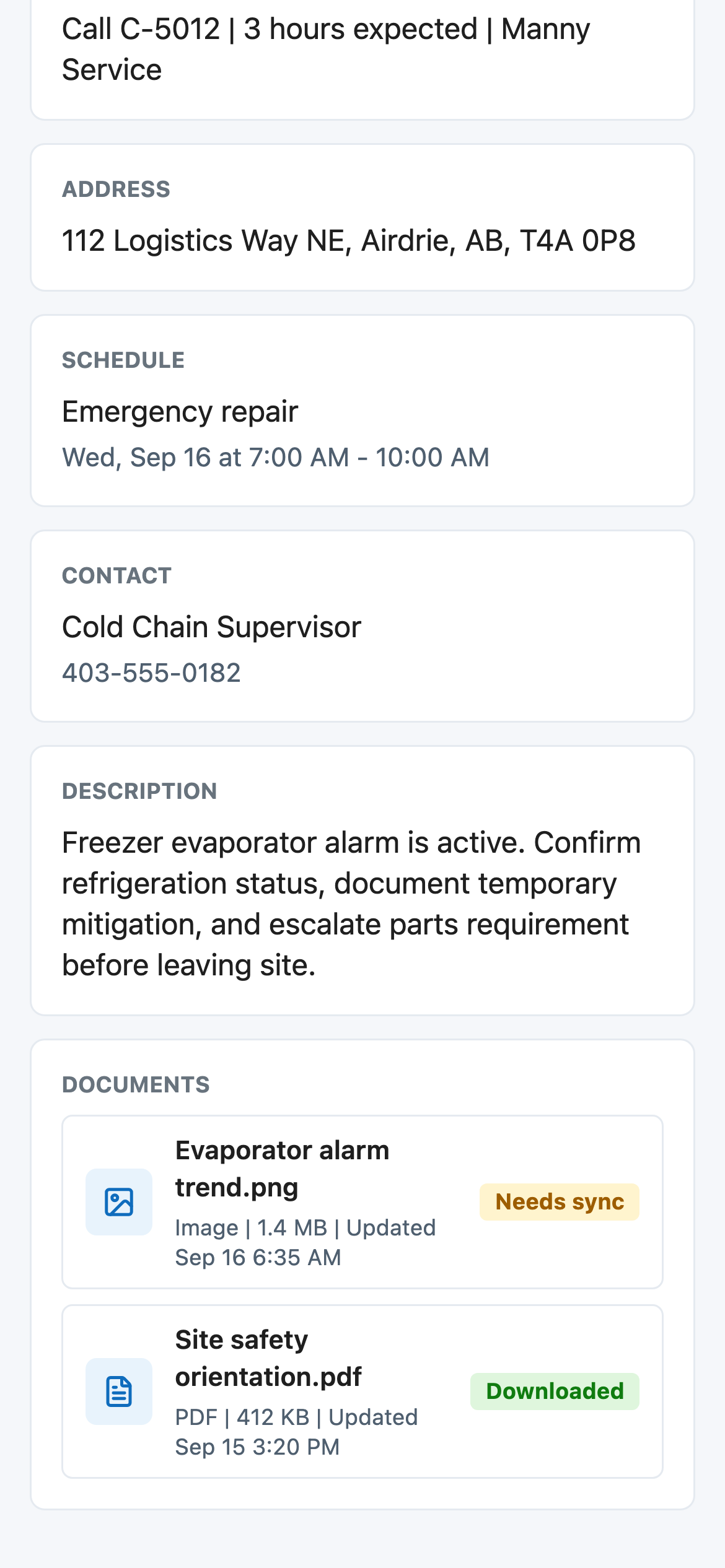
LocalKeep reading locally
The current job remains readable from the same cached contract used by the online screen.
04
RefreshRefresh when possible
When the network returns, sync refreshes the snapshot without changing the screen model.
Local job snapshot
Assigned jobs, schedule details, customer context, address, service type, status, and sync metadata.
Kept out of local storage
Service credentials, client secrets, production token material, and long-term document storage.
For the proof of concept, the local store held approved read-model data and sync metadata. It did not store Business Central service credentials, client secrets, token material, or anything that should require secure storage.
Offline boundary details
What was cached
Assigned jobs, schedule details, customer context, address, service type, status, and sync metadata.
What stayed out
Service credentials, client secrets, production token material, and long-term document storage.
Why writes were deferred
Offline writes require conflict rules, retention policy, retry behaviour, and support diagnostics.
What the UI proved
Screens could keep reading from the same local model while online sync updated that model in the background.
What the prototype established
One codebase reached both target devices
The shared product model could target Android and Windows without becoming two unrelated experiences.
Previously loaded jobs remained usable offline
Assigned work and job details could remain available when connectivity disappeared.
Enterprise systems stayed behind a controlled boundary
Technicians authenticated through Entra ID while Business Central data was mapped through the application layer.
The remaining production risks became specific
Conflict resolution, managed distribution, document lifecycle, and observability could be planned as known work.
The proof of concept gave Kwixand a working reference for the Hardy direction. It changed the conversation from "Should this be possible?" to "Which workflows should be added after the foundation?"
The prototype proved the delivery model and offline read workflow. Production hardening, offline write conflicts, device management, document lifecycle, and broader Business Central integration remained outside its scope.
That boundary was the point. The work replaced several expensive assumptions with tested architectural decisions, starting with the places technicians actually work.